STRUCTURAL STEEL TAKEOFF SOFTWARE
Steel takeoff software with the price on the page
SteelFlo is structural steel takeoff software for fabricators: you upload a PDF drawing set, the AI finds and boxes every steel member on every page, your estimator verifies each detection against the drawing, and you export a bill of materials or a priced estimate.
With AI detection plus human verification, SteelFlo delivers 95-99% accuracy and covers 4,700+ steel sections across 6 standards (AISC, BS/IS, AS/NZS, EN, GB, and CFS/SSMA cold-formed).
Every new account gets 3 free takeoffs with no credit card. After that you can buy a $99 One-Job Pass or subscribe from $399/month.
The count is the number of boxes on the drawing. No inference, no black-box totals. If a member isn't boxed and verified, it doesn't go in your BOM, which is what makes the output defensible when a PM asks where a number came from.
3 FREE TAKEOFFS · NO CREDIT CARD · PRO $399/MO · PATENT PENDING
PUBLISHED PRICING · USD
Full pricing →Free
$0no card
3 AI takeoffs, CSV export
One-Job Pass
$99one-time
5 takeoff credits, no subscription
Pro
$399/month
10 takeoffs/month, 1 seat
Business
$599/month
25 takeoffs/month, 3 seats
Enterprise
from $1,499/month
60 takeoffs/month, dedicated support
Published pricing. No demo call, no quote form.
“First time I ran it, I thought the AI was wrong — the count was higher than my own takeoff. I pulled out the drawings to prove it. Turns out I was the one who missed a piece.”
HOW IT WORKS
PDF in. Verified takeoff out.
Four steps from the PDF the engineer sent you to a bill of materials your shop can price. The AI does the counting; your estimator does the judgment.
Upload your PDF
Drop the structural drawing set — any page count, text-based or scanned. No CAD files, no model exports, no reformatting. The PDF you already got from the engineer is the input.
AI finds every member
The detection engine scans every page and draws a box around every steel member callout it finds — beams, columns, HSS, angles, channels, plates. It auto-detects which steel standard the drawings use and looks up section weights accordingly.
Your estimator verifies
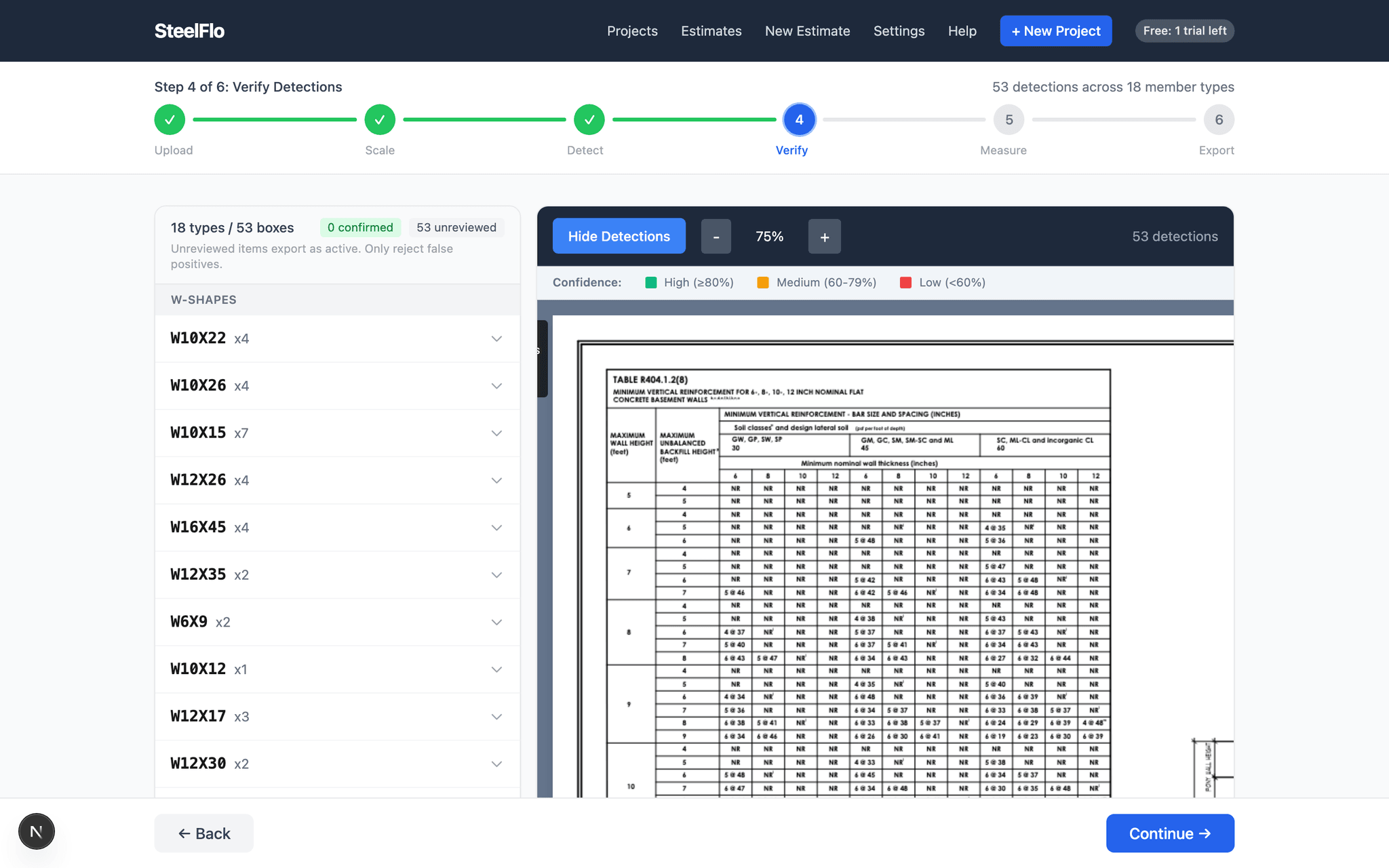
Every detection is traceable to its exact spot on the drawing. High-confidence items can be bulk-confirmed; flagged items get inspected one by one. Nothing exports unverified — the count is what you approved, not what a black box guessed.
Export BOM or priced estimate
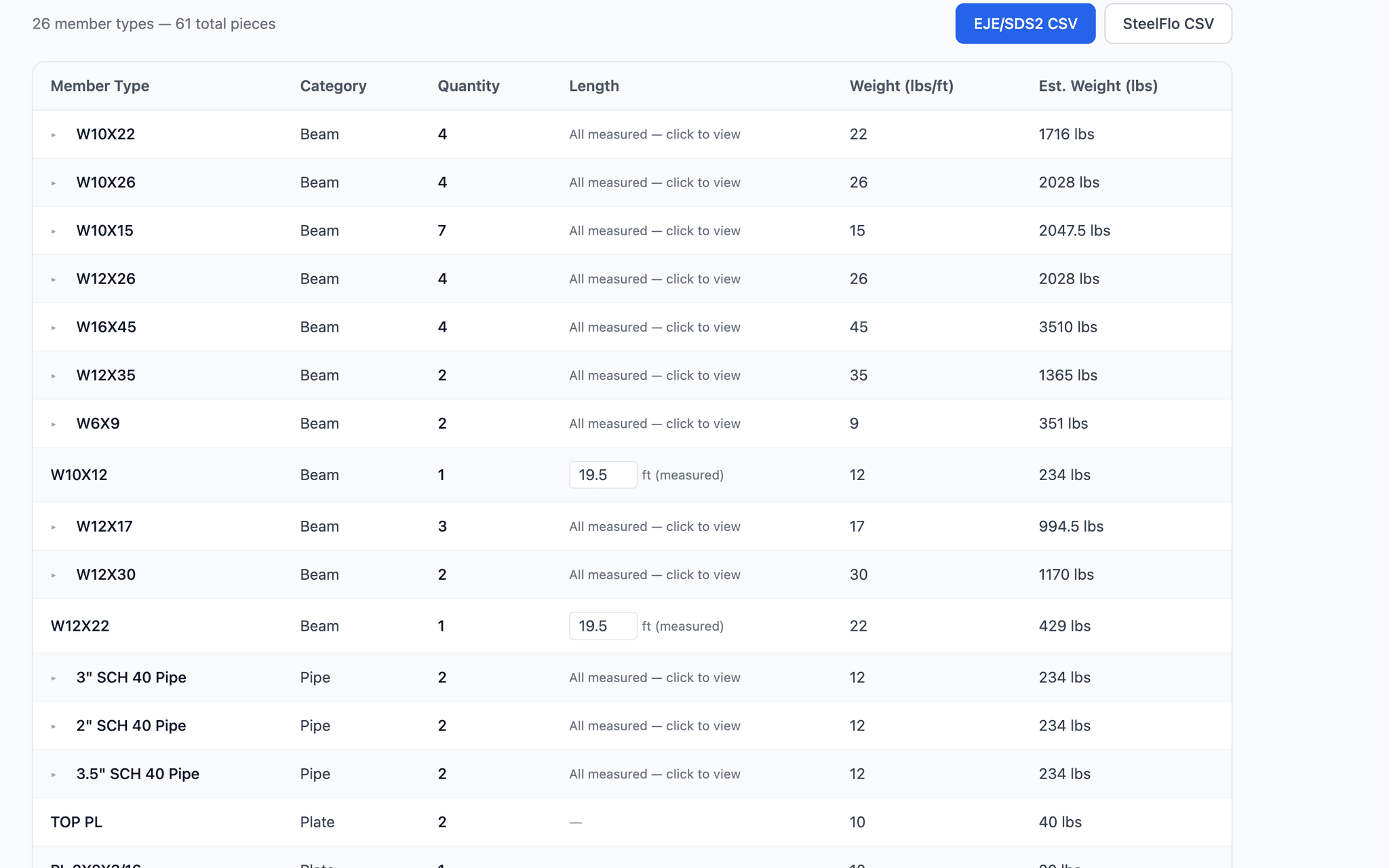
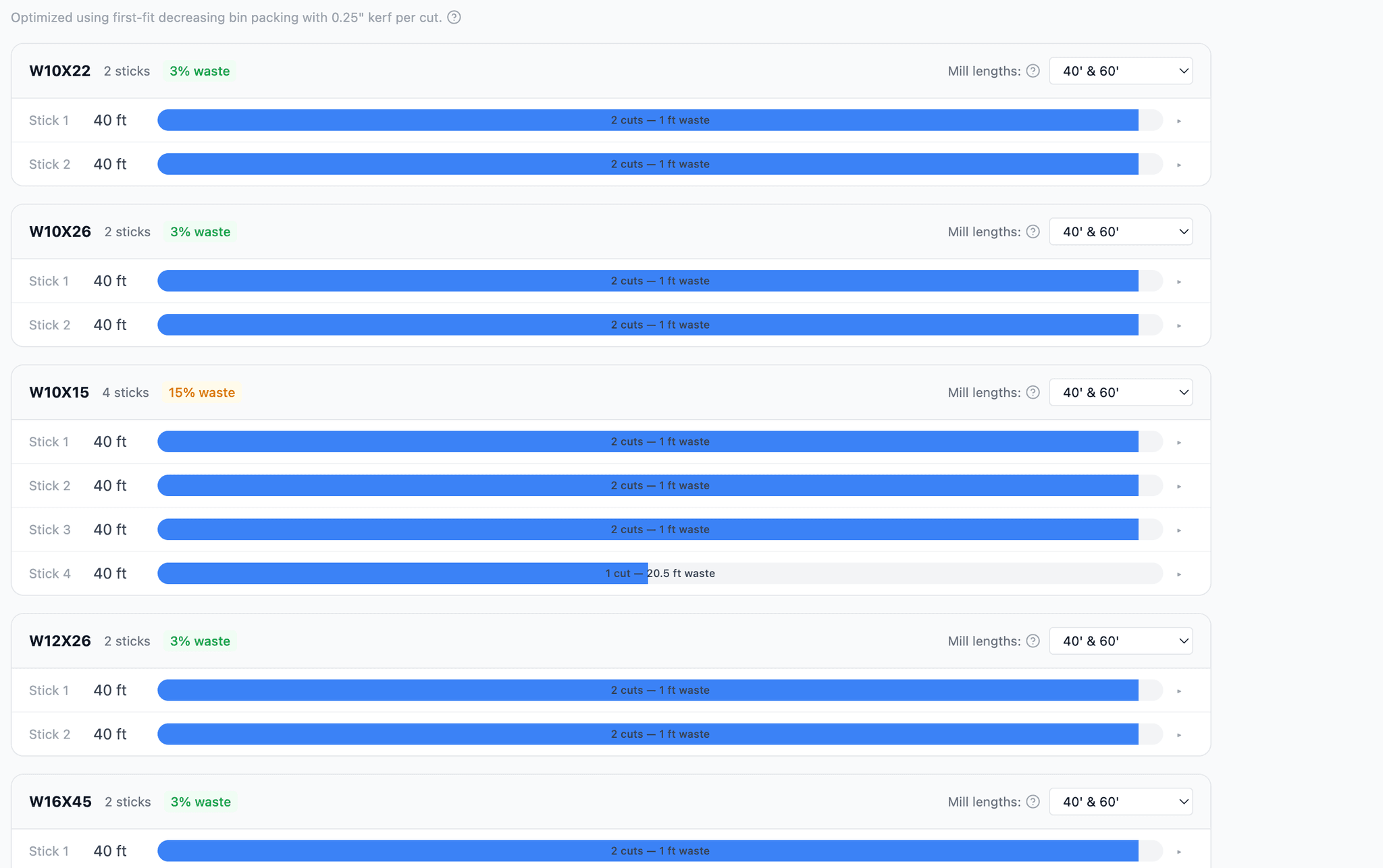
Generate a cut list, a nesting-optimized order sheet with waste percentages, or run the verified takeoff straight through the pricing engine with your own material, labor, and markup rates.
WHAT IT FINDS
Every kind of member on a structural set
A structural drawing set is more than beams and columns. SteelFlo boxes each of the following where it appears, so the count matches what is actually printed on the sheets.
Beams and girders
Wide-flange, I-beam, and universal sections by size callout, on plans, sections, and schedules.
Columns
Column callouts from plans and column schedules, kept apart from the beams around them.
Braces and joists
Brace members, bar joists, and joist girders listed as their own groups so you can price or buy them out separately.
HSS and pipe
Square, rectangular, and round hollow sections, and pipe by nominal size and schedule.
Angles and channels
Equal and unequal angles, channels, and tees, including shorthand and fractional sizes.
Plates
Plates and flats by thickness and width. Plate callouts with no printed size are flagged for you instead of guessed.
Cold-formed framing
Studs, tracks, and joists from cold-formed steel drawings.
Connections
Connection callouts can be detected and reviewed alongside the members they join.
Schedules
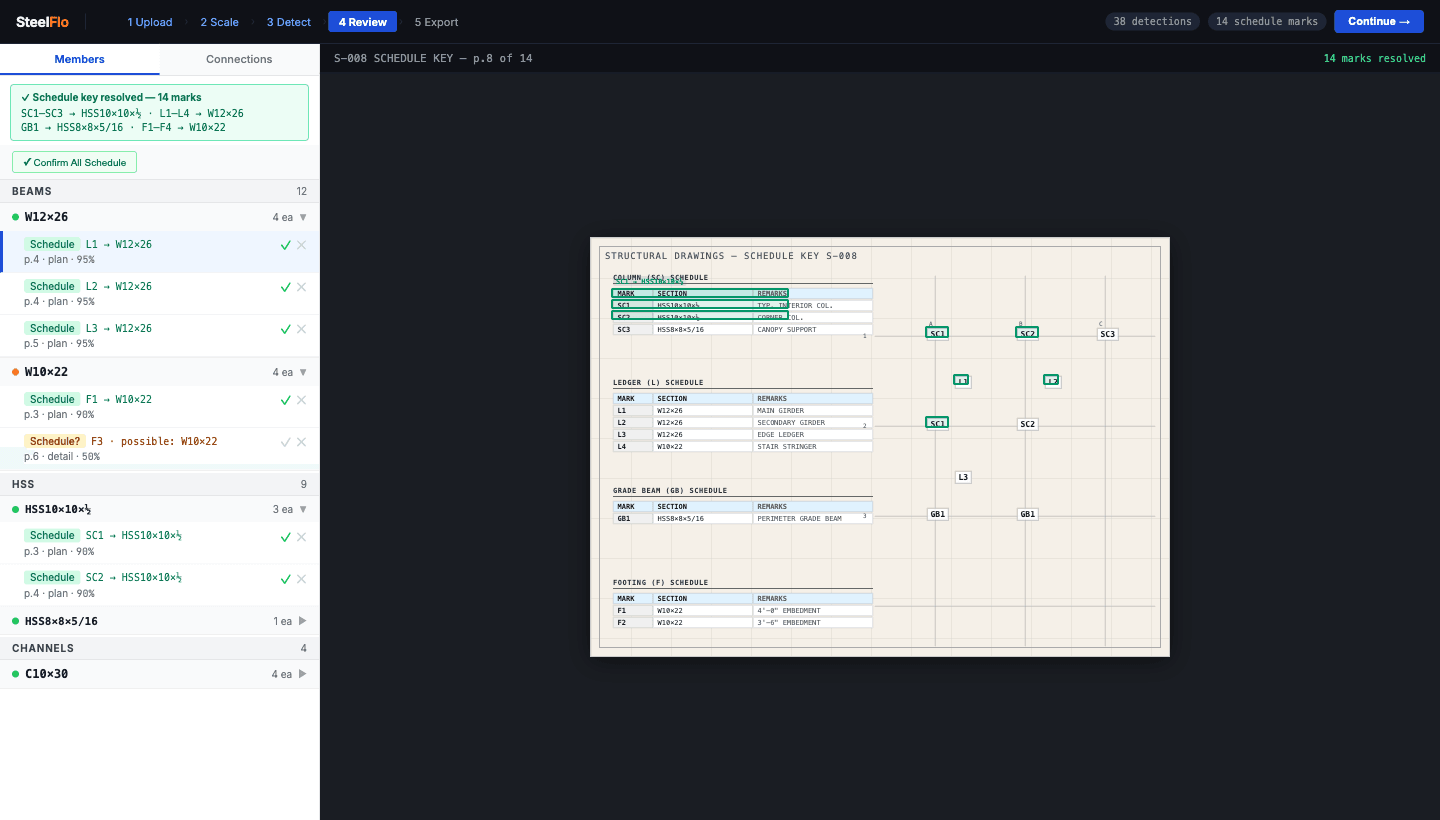
Member schedules and key tables are read, so a mark on the plan resolves to the right section.
Each detection carries its section, its sheet, and its position on that sheet. That is what lets a reviewer jump from a BOM line straight to the drawing and check it in a few seconds.
THE REVIEW STEP
The part that makes the number trustworthy
Detection is the fast part. Review is where the takeoff becomes yours. High-confidence detections can be confirmed in bulk, and anything the system is less sure about is set aside for a closer look: a callout that could be a note, a plate with no size, a section that does not exist in the catalogue. You confirm or reject each one, and you can click a row to measure a length straight off the drawing.
Over-flagging is deliberate. A flagged item costs you one click. A missed member costs you money on the job. The published 95-99% accuracy figure describes the combination of AI detection and this human review, and we would rather you read it that way.
STANDARDS AND DRAWINGS
4,700+ sections, 6 standards, any PDF
US work is the home case: AISC wide-flange, S-shapes, channels, angles, HSS, and pipe. But fabricators get drawings from everywhere. SteelFlo also covers BS/IS (UK, India), AS/NZS (Australia, New Zealand), EN (Europe), GB (China), and CFS/SSMA cold-formed framing, and it works out which one a drawing uses. Metric drawings come out in metric units rather than being converted behind your back.
On the input side, the PDF is the interface. Text-based exports from Tekla, SDS/2, and AutoCAD work, flattened CAD output works, and scanned or raster drawings work too, with the caveat that a poor scan is harder to read for people and software alike. For the details, see our guide to takeoffs from scanned drawings.
Want to check a section before you upload anything? Browse the shapes reference or run numbers in the free steel cost calculator.
OUTPUTS
What you get when the review is done
CSV bill of materials
Member, quantity, length, and weight in a clean file that opens in Excel or imports into other systems.
Cut list
Pieces grouped by section and length so the shop knows what to cut.
Nesting order sheet
Cut pieces arranged onto standard mill lengths, with waste shown per member type, so you order what you will actually use.
Priced estimate
Run the verified takeoff through the pricing engine with your own material, labor, overhead, and markup rates.
More on how these fit together in takeoff vs estimate and exporting takeoffs to Tekla, PowerFab, and Strumis.
MANUAL VS AI
Manual takeoff compared with AI plus review
| Manual / generic takeoff tools | SteelFlo | |
|---|---|---|
| First pass over the drawings | Estimator scrolls sheet by sheet, clicking each member | AI boxes every member on every page |
| Time on a mid-size set | Hours to days | Minutes of detection, then review time |
| Weights and tonnage | Look up each section in a table or spreadsheet | Section database fills weights automatically |
| Missed members | Found late, if at all | Visible as unboxed callouts during review |
| Audit trail | A spreadsheet and memory | Every line links to its spot on the sheet |
| Other standards and metric | Separate tables, manual conversion | 6 standards, native units |
| Outputs | Whatever you build by hand | CSV, cut list, nesting order sheet, priced estimate |
This is not an argument against estimators. The people who do this work well are the ones who know what a drawing means. The aim is to move their hours from counting to checking. Read the longer version in manual vs AI steel estimating.
WHO IT'S FOR
Shops that bid more jobs than they can count by hand
Fabricators and erectors
Quote faster on more tenders, and stop pricing from a count you cannot trace.
Estimating consultants
Turn around takeoffs for clients with a record of every box you approved.
General contractors
Get a steel quantity to sanity-check subcontractor bids without hiring a specialist.
Misc metals and rail shops
Plates, lintels, angles, and support steel caught in the same pass as the framing.
Metal building suppliers
Pull framing quantities from engineer-stamped sets and PEB packages.
International shops
Work in kg/m and metric tonnes on UK, European, and Australian drawings.
THE ACTUAL PRODUCT
What you see on screen
FREQUENTLY ASKED QUESTIONS
Straight answers
01What is structural steel takeoff software?
Structural steel takeoff software extracts every steel member from a set of construction drawings (shapes, sizes, lengths, and quantities) and compiles them into a bill of materials. Manual tools make you click and count each member yourself. AI-powered tools like SteelFlo read the PDF for you: the AI finds and boxes every member callout, and your estimator verifies the results instead of counting from scratch.
02How accurate is AI steel takeoff?
SteelFlo delivers 95-99% accuracy, and that figure is for AI detection plus human verification, not raw AI output. The AI finds and boxes every member it detects; your estimator reviews the boxes before anything exports. Every detection is traceable to its exact location on the drawing, so verification takes minutes, not hours.
03How much does each takeoff cost?
It depends on how you buy. New accounts get 3 free takeoffs with no credit card. The One-Job Pass is $99 one time for 5 takeoff credits, which works out to under $20 a takeoff. Pro is $399/month for 10 takeoffs, Business is $599/month for 25, and Enterprise starts at $1,499/month for 60. All of it is published at /pricing.
04What drawings does SteelFlo handle?
PDF structural drawings, the format engineers already deliver. That includes text-based PDFs from Tekla, SDS/2, or AutoCAD, CAD-flattened exports, and scanned or raster drawings. Uploads can be up to 50 MB, at any page count and any scale.
05Can it read scanned drawings?
Yes. Scanned and raster sets go through the same upload. Scans take longer than text-based PDFs, and image quality matters: a crisp scan reads far better than a faxed copy of a copy. Every detection still goes through your review, so a smudged callout gets caught by a person rather than silently counted.
06Which steel standards are supported, and can it read international drawings?
Six standards with 4,700+ sections total: AISC (US), BS/IS (UK, India, Middle East), AS/NZS (Australia, New Zealand), EN (Europe), GB (China), and CFS/SSMA cold-formed steel. SteelFlo identifies the standard from the drawings and applies the right section weights and units. Metric drawings are reported in metric units.
07Does it work for misc metals like stairs, lintels, and plates?
It detects plates, angles, channels, pipe, and HSS callouts alongside the main framing, so lintels, base plates, and support steel show up in the same takeoff. Items with no size printed on the drawing are held out of the count until you confirm them. Assemblies such as stairs and railings are still priced by the estimator from the detected members.
08How does it compare with Bluebeam and other manual takeoff tools?
Markup and measurement tools are general-purpose: you click each member, assign it a type, and count. They have no steel section database, so weights and tonnage are a separate spreadsheet step. SteelFlo is built for steel only. The AI does the first pass across every page, the section database supplies weights, and you spend your time verifying. See the head-to-head posts on the blog for detail.
09Is there a free trial?
Yes. Every new account gets 3 free takeoffs with no credit card, on your own drawings. The free calculator at /calculator needs no account at all.
10How long does a takeoff take with SteelFlo?
Most jobs finish detection in under 5 minutes; large scanned sets can take longer. Compare that with several hours for a manual takeoff on a small-to-medium project. Your estimator then spends their time verifying and applying judgment instead of counting.
11Does the AI replace my estimator?
No. The AI does the exhaustive scanning and counting; your estimator does the judgment: verifying detections, resolving drawing conflicts, filtering scope, and pricing. That division of labor is why the verified output reaches 95-99% accuracy.
Looking at this from the other side of the workflow? See steel estimating software: pricing the takeoff into a bid.
Run it on a real job
Upload a drawing set you already estimated by hand and compare the numbers. 3 free takeoffs, no credit card, no sales call.